

Register your association
Make your association visible to students and partners, and publish events in Sammen’s event calendar! Here we show you, step by step, how to create an association page for your organization.
Last updated:

Getting started with your association’s homepage
To appear in the association overview and be able to publish events, you first need to create a association page. Luckily, this is quite easy. Follow the steps below and you will be up and running.
Step 1: Create a personal user account
To create an association, you need a personal user account. Here is how to do it:
- Go to “My page”
- Click "Log in"
- Select "Use another account" by clicking the plus symbol
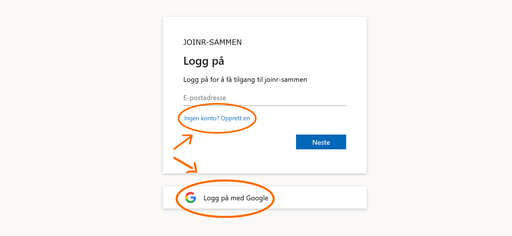
- Choose either "No account? Create one" or "Sign in with Google" (see image)
When creating your personal user account, make sure to use your personal email address, not the association’s or your role email. This makes it easier to follow up and manage the association over time. You can add the association’s own email address when you create the association in the next step.
Step 2: Add the association
Once your user account is ready, you can create the association itself. This is how:
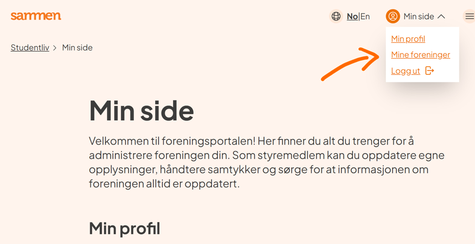
- Go to "My page" in the top right corner and select "My associations" (see image)
- Click "Create association"
- Fill in the information about the association and submit the form
Important to note: At the moment, it is not possible to save what you write along the way. Make sure to complete all fields and submit the form before leaving the page.
What happens after you register the association?
After you have registered the association, it is usually approved within one to two days. Once approved, the association will appear in the association overview on Sammen. However, already from the moment the form is submitted, you can:
- add other board members
- create and publish events in the event calendar
- keep the association information up to date
If anything is missing from the association profile, for example if the bylaws have not been uploaded correctly, we will contact you before the page is published. You will of course receive guidance and help to get everything in place. Once this is done, you are ready to reach more students. Good luck!